Get notified by email when this product is in stock.
All 29 Photoshop actions. Eight groups, from retouching to delivery.
See the full panel and follow the edit on a TDMC19 photograph. The gallery shows how to separate skin texture and tone, shape the light, build film halation, add grain, frame the shot and export it.
06 · Cinema (5) 2.35:1 Crop · 2.39:1 Crop · 1.85:1 Crop · Soft Contrast · Cool Shadows. Preview the framing, crop to a layered copy, and edit the looks as Curves layers.
07 · Instagram Export (4) Feed 4:5 (1080 × 1350) · Feed 3:4 (1080 × 1440) · Story 9:16 (1080 × 1920) · Scope Fit 4:5. All four save sRGB JPEGs.
08 · Print & Web (3) Lab JPEG 300 ppi · Lossless TIFF 300 ppi · Web JPEG up to 2048 px on the long edge. Print presets preserve source pixel dimensions.
Inside the ZIP One installer, all 29 actions in English and an illustrated Quick Start PDF. Requires desktop Adobe Photoshop. Tested in Photoshop 2026 on Windows with 8-bit and 16-bit RGB files.
Digital download. One-time purchase.
All 29 Photoshop actions. Eight groups, from retouching to delivery.
See the full panel and follow the edit on a TDMC19 photograph. The gallery shows how to separate skin texture and tone, shape the light, build film halation, add grain, frame the shot and export it.
06 · Cinema (5) 2.35:1 Crop · 2.39:1 Crop · 1.85:1 Crop · Soft Contrast · Cool Shadows. Preview the framing, crop to a layered copy, and edit the looks as Curves layers.
07 · Instagram Export (4) Feed 4:5 (1080 × 1350) · Feed 3:4 (1080 × 1440) · Story 9:16 (1080 × 1920) · Scope Fit 4:5. All four save sRGB JPEGs.
08 · Print & Web (3) Lab JPEG 300 ppi · Lossless TIFF 300 ppi · Web JPEG up to 2048 px on the long edge. Print presets preserve source pixel dimensions.
Inside the ZIP One installer, all 29 actions in English and an illustrated Quick Start PDF. Requires desktop Adobe Photoshop. Tested in Photoshop 2026 on Windows with 8-bit and 16-bit RGB files.
Tran Diep Minh Chien Lange Str. 81 27749 Delmenhorst Deutschland
Verbraucherstreitbeilegung
Wir sind nicht bereit oder verpflichtet, an Streitbeilegungsverfahren vor einer Verbraucherschlichtungsstelle teilzunehmen.
02 / Ihre Daten
Datenschutzerklärung
Verantwortlich für die Verarbeitung auf dieser Website ist Tran Diep Minh Chien, Lange Str. 81, 27749 Delmenhorst, Deutschland. Für Datenschutzanfragen erreichen Sie uns unter contact@tdmc19.com.
Diese Erklärung beschreibt Websitebesuche, Anfragen, Bestellungen, Unterstützungszahlungen, Kurszugänge, Umfragen und Marketing. Die Rechtsgrundlagen ergeben sich insbesondere aus der Datenschutz-Grundverordnung (DSGVO) und dem TDDDG. Pflichtangaben sind im jeweiligen Formular gekennzeichnet. Ohne erforderliche Kontakt-, Bestell- oder Zahlungsangaben können wir die gewünschte Leistung nicht erbringen; freiwillige Angaben bleiben optional.
Websitebetrieb und Analyse
Squarespace
Die Website, der Shop sowie Kunden- und Kurskonten werden über Squarespace bereitgestellt. Anbieter für Kunden außerhalb der USA ist Squarespace Ireland Limited, Squarespace House, Ship Street Great, Dublin 8, D08N12C, Irland. Technische Zugriffsdaten umfassen insbesondere IP-Adresse, Zeitpunkt, angeforderte Seite, übertragene Daten, Browser-, Geräte- und Verbindungsinformationen.
Die Bereitstellung, Fehlerbehebung und Absicherung des Angebots erfolgen auf Grundlage von Art. 6 Abs. 1 lit. f DSGVO. Unser berechtigtes Interesse liegt an einer zuverlässigen und sicheren Website. Für angeforderte Vertragsleistungen gilt Art. 6 Abs. 1 lit. b DSGVO. Squarespace verarbeitet Daten nach seinen Datenverarbeitungsbedingungen; je nach Zweck als Auftragsverarbeiter oder für eigene Zwecke als Verantwortlicher. Weitere Angaben enthält die Squarespace-Datenschutzerklärung.
Besuchsstatistik
Squarespace stellt Aufruf- und Nutzungsstatistiken bereit. Analyse-Cookies werden durch die Cookie-Auswahl gesteuert und setzen Ihre Einwilligung voraus (Art. 6 Abs. 1 lit. a DSGVO). Auch ohne Analyse-Cookies können technische Seitenaufrufe in einer Basisstatistik erfasst werden. Soweit hierfür personenbezogene Zugriffsdaten verarbeitet werden, dient dies auf Grundlage von Art. 6 Abs. 1 lit. f DSGVO der Bereitstellung und Verbesserung unseres Angebots. Das optionale Squarespace Activity Log mit einzelnen Besucheraktivitäten ist deaktiviert.
Cookies und Ihre Auswahl
Cookies und ähnliche Techniken dienen beispielsweise dem Warenkorb, der Anmeldung, der Sicherheit und der Speicherung Ihrer Datenschutzauswahl. Für unbedingt erforderliche Speicherungen und Zugriffe gilt § 25 Abs. 2 TDDDG. Die anschließende Verarbeitung personenbezogener Daten beruht je nach Zweck auf Art. 6 Abs. 1 lit. b oder f DSGVO.
Nicht erforderliche Gerätezugriffe für Analyse und Werbung benötigen vorher Ihre Einwilligung nach § 25 Abs. 1 TDDDG. Personenbezogene Daten verarbeiten wir hierfür auf Grundlage von Art. 6 Abs. 1 lit. a DSGVO. Im Banner können Sie alle optionalen Cookies akzeptieren, sie ablehnen oder Ihre Auswahl verwalten. Die Website bleibt bei Ablehnung grundsätzlich nutzbar.
Über Cookie Preferences können Sie Ihre Auswahl jederzeit ändern oder eine Einwilligung mit Wirkung für die Zukunft widerrufen. Eine vorherige Verarbeitung wird dadurch nicht nachträglich rechtswidrig. Informationen zu Namen, Zwecken und Laufzeiten der Squarespace-Cookies finden Sie in der aktuellen Cookie-Übersicht des Anbieters.
Kontakt und Anfragen
Wenn Sie uns per Formular, E-Mail oder Telefon kontaktieren, verarbeiten wir die übermittelten Namen, Kontaktdaten und Inhalte, um Ihre Anfrage zu bearbeiten. Bei Fragen zu einer Buchung oder einem Vertrag ist Art. 6 Abs. 1 lit. b DSGVO die Grundlage. Sonstige Korrespondenz beruht auf Art. 6 Abs. 1 lit. f DSGVO und unserem Interesse an einer sachgerechten Kommunikation.
Technische Empfänger können Squarespace und die eingesetzten E-Mail-Dienste sein. Bitte übermitteln Sie nur Angaben, die für Ihr Anliegen benötigt werden, und keine vertraulichen Daten anderer Personen ohne entsprechende Berechtigung.
Shop, Kurse und Zahlungen
Bei Käufen, Workshop-Buchungen, Unterstützungszahlungen und Mitgliederzugängen benötigen wir insbesondere Namen, Kontakt-, Bestell-, Rechnungs- und gegebenenfalls Lieferdaten. Hinzu kommen Kontodaten zur Anmeldung und Informationen zum gebuchten Kurszugang. Wir verarbeiten diese Daten zur Vertragsdurchführung, Bereitstellung der Inhalte und zugehörigen Kommunikation (Art. 6 Abs. 1 lit. b DSGVO). Steuer- und handelsrechtliche Nachweispflichten beruhen auf Art. 6 Abs. 1 lit. c DSGVO.
Empfänger sind im erforderlichen Umfang die Shop- und Kursplattform, Zahlungsdienste und bei physischen Bestellungen die mit der Lieferung beauftragten Dienstleister. Bei der Wahrnehmung rechtlicher oder steuerlicher Pflichten können zuständige Behörden und fachliche Berater Daten erhalten.
Zahlungsanbieter
Die angebotenen Zahlungen werden über Squarespace Payments mit Stripe als beteiligtem Zahlungsdienst sowie über PayPal abgewickelt. Für bereits gespeicherte Zahlungsarten kann weiterhin die frühere Stripe-Anbindung verwendet werden. Der tatsächlich gewählte Zahlungsweg wird beim Bezahlvorgang angezeigt. Erforderliche Zahlungs-, Rechnungs- und Transaktionsdaten werden zur Abwicklung übermittelt (Art. 6 Abs. 1 lit. b DSGVO); wir erhalten unter anderem Bestätigungen und Zahlungsstatus.
PayPal-Anbieter für den europäischen Raum ist PayPal (Europe) S.à r.l. et Cie, S.C.A., 22–24 Boulevard Royal, L-2449 Luxemburg. Zahlungsdienste verarbeiten Daten daneben für eigene gesetzliche, Sicherheits- und Betrugspräventionszwecke und können hierfür eigene Verantwortliche sein. Einzelheiten: Squarespace, Stripe und PayPal.
E-Mails und Werbung
Squarespace Email Campaigns
Wir verwenden Squarespace Email Campaigns auch für automatisierte Abläufe. Bestell-, Zahlungs- und Zugangsnachrichten dienen der angeforderten Leistung (Art. 6 Abs. 1 lit. b DSGVO). Für Newsletter und werbliche Angebote verwenden wir eine entsprechende Einwilligung nach Art. 6 Abs. 1 lit. a DSGVO. Eine Bestellung, Unterstützungszahlung oder Umfrageteilnahme ersetzt keine Newsletter-Anmeldung.
Die Versandplattform kann Öffnungen über in E-Mails eingebundene kleine Bilder und Klicks über zugeordnete Links erfassen. Hierbei können etwa Zeitpunkt, IP-Adresse und Browserinformationen anfallen und einem Empfänger zugeordnet werden. Die einwilligungsbedürftige Erfolgsmessung ist von notwendigen Versand- und Zustellinformationen zu unterscheiden. Eine Einwilligung können Sie jederzeit über die Abmeldefunktion oder per E-Mail widerrufen. Angaben zur Anmeldung und erteilte Einwilligungen dienen auch dem Nachweis der zulässigen Zusendung.
Google Ads – Erfolgsmessung
Nach Ihrer Einwilligung in Werbe-Cookies verwenden wir Google Ads, um zu messen, ob ein Anzeigenklick zu einer Bestellung führt. Anbieter im Europäischen Wirtschaftsraum ist Google Ireland Limited. Dabei können Anzeigen- und Cookie-Kennungen, technische Geräte- und Verbindungsdaten sowie Auftragsnummer, Bestellwert und Währung verarbeitet werden. Rechtsgrundlagen sind Art. 6 Abs. 1 lit. a DSGVO und für einwilligungsbedürftige Gerätezugriffe § 25 Abs. 1 TDDDG.
Der Google-Ads-Code wird erst nach Ihrer Zustimmung zu Advertising-Cookies geladen. Unsere individuelle Kaufmessung übermittelt keine E-Mail-Adresse oder Telefonnummer; erweiterte Conversions und personalisierte Google-Werbesignale sind nicht aktiviert. Über Cookie Preferences können Sie Ihre Entscheidung jederzeit ändern. Weitere Informationen finden Sie bei Google zum Datenschutz in Unternehmensprodukten und in der Google-Datenschutzerklärung. Je nach Verarbeitung können Daten auch außerhalb des EWR verarbeitet werden; hierzu gelten die Angaben zu internationalen Übermittlungen und die Informationen von Google.
Meta-Pixel
Die Meta-Pixel-Integration dient der Messung von Werbung und der Bildung von Zielgruppen. Mit erteilter Werbeeinwilligung können insbesondere besuchte Seiten, Ereignisse, IP-Adresse, Browser- und Geräteangaben an Meta Platforms Ireland Limited übermittelt und mit Meta-Kontodaten verknüpft werden. Grundlage sind Art. 6 Abs. 1 lit. a DSGVO und bei Gerätezugriffen § 25 Abs. 1 TDDDG. Die Cookie-Einstellungen steuern Ihre Werbeauswahl.
Für die von der Vereinbarung erfasste Erhebung und Übermittlung besteht eine gemeinsame Verantwortlichkeit mit Meta; die spätere eigene Verarbeitung durch Meta ist davon zu unterscheiden. Weitere Informationen und die Verteilung der Aufgaben finden Sie in der Vereinbarung zur gemeinsamen Verantwortlichkeit und der Meta-Datenschutzerklärung.
Technische Grenze der Cookie-Auswahl
Die integrierte Squarespace-Anbindung lädt derzeit die Meta-Programmbibliothek bereits beim Seitenaufruf. Hierbei entstehen technische Verbindungsdaten auch ohne Zustimmung zu Werbe-Cookies. Die Cookie-Auswahl steuert die Einwilligung für Werbe-Cookies und die Pixel-Messung; sie ist keine vollständige Sperre jeder Netzwerkverbindung zu Meta.
Formularschutz und externe Dienste
Google reCAPTCHA Enterprise
Squarespace-Formulare verwenden Google reCAPTCHA Enterprise, um Spam, Betrug und automatisierten Missbrauch zu erkennen. Dabei können Verbindungs-, Geräte-, Browser- und Interaktionsdaten einschließlich der IP-Adresse an Google übermittelt werden. Die Absicherung von Formularen beruht auf unserem berechtigten Interesse nach Art. 6 Abs. 1 lit. f DSGVO. Für Speicherungen und Zugriffe auf Ihrem Gerät gelten zusätzlich die Voraussetzungen des § 25 TDDDG.
Die Umfrage zu Ihrer Erfahrung beim Lernen von Fotografie ist extern zu Google Forms verlinkt. Erst beim Öffnen wechseln Sie zu Google. Die Teilnahme ist freiwillig; weder ein Kauf noch die Angabe von Kontaktdaten sind für das Sample erforderlich. Der Downloadlink erscheint nach dem Absenden auf der Bestätigungsseite.
Wir verwenden Antworten zur Erforschung und Verbesserung unseres Fotografie-Unterrichts und bewahren sie entsprechend dem Hinweis in der Umfrage bis zu zwölf Monate auf. Soweit Antworten einen Personenbezug haben, dient die Verarbeitung auf Grundlage von Art. 6 Abs. 1 lit. f DSGVO unserem Interesse an der bedarfsgerechten Verbesserung des Angebots. Freiwillig hinterlassene Kontaktdaten werden nur für die dort beschriebene einzelne Forschungsrückfrage verwendet, nicht für Marketing. Einzelne Antworten und Kontakte werden nicht veröffentlicht.
Bitte nennen Sie keine privaten Angaben zu Kunden oder anderen Personen. Soweit wir Ihre Antwort zuordnen können, können Sie sich für einen Widerspruch, einen Rückzug aus der Untersuchung oder sonstige Datenanfragen an tdmc.dima@gmail.com oder unsere Datenschutz-Kontaktadresse wenden. Google stellt die Plattform bereit und verarbeitet dabei technische Daten nach seiner Datenschutzerklärung; im europäischen Kontext ist insbesondere Google Ireland Limited beteiligt.
Social Media und Kurs-Community
Social-Media- und Partnerangebote werden über externe Links aufgerufen. Beim Wechsel zum jeweiligen Angebot gelten zusätzlich dessen Datenschutzhinweise. Bei der Teilnahme an der Discord-Kurscommunity verarbeiten wir insbesondere Kontaktnamen, Beiträge und eingereichte Arbeiten im Rahmen der vereinbarten Betreuung (Art. 6 Abs. 1 lit. b DSGVO). Discord verarbeitet Daten daneben nach seiner eigenen Datenschutzerklärung. Die Sichtbarkeit Ihrer Beiträge richtet sich nach dem gewählten Kanal.
Internationale Übermittlungen
Die genannten Plattform-, Kommunikations-, Sicherheits- und Zahlungsanbieter können Daten auch außerhalb des Europäischen Wirtschaftsraums verarbeiten, insbesondere in den USA. Maßgeblich sind die jeweiligen Empfänger und Dienste. Als Garantien kommen ein anwendbarer Angemessenheitsbeschluss nach Art. 45 DSGVO oder geeignete Garantien nach Art. 46 DSGVO, insbesondere Standardvertragsklauseln, in Betracht.
Squarespace nennt für die entsprechenden Übermittlungen an Squarespace, Inc. das EU-US Data Privacy Framework und für weitere erfasste Fälle Standardvertragsklauseln in seinen Datenverarbeitungsbedingungen. Diese Aussage gilt nicht pauschal für jeden anderen Anbieter. Weitere Informationen zu den für eine konkrete Verarbeitung eingesetzten Garantien und eine Kopie der maßgeblichen Garantien können Sie über unsere Kontaktadresse anfordern.
Wie lange werden Daten gespeichert?
Wir bewahren personenbezogene Daten nur so lange auf, wie sie für den jeweiligen Zweck, eine laufende Vertragsbeziehung oder gesetzliche Pflichten benötigt werden. Für Anfragen sind insbesondere die abschließende Bearbeitung und gegebenenfalls anschließende Vertragsleistungen maßgeblich. Bei Kurs- und Kundenkonten berücksichtigen wir die vereinbarte Zugangs- und Betreuungsdauer. Umfrageantworten werden entsprechend dem oben genannten Zweck für höchstens zwölf Monate benötigt.
Nach Wegfall eines Zwecks löschen wir Daten, soweit keine gesetzlichen Pflichten oder erforderliche Nachweise entgegenstehen. Für die Geltendmachung oder Abwehr von Ansprüchen sowie für Einwilligungs- und Widerspruchsnachweise kann eine begrenzte weitere Speicherung erforderlich sein. Abgemeldete Adressen können in einer Sperrliste bleiben, damit keine weitere Werbung versendet wird.
Für aufbewahrungspflichtige Unterlagen gelten, soweit einschlägig, regelmäßig acht Jahre für Rechnungen und Buchungsbelege, zehn Jahre für bestimmte Bücher und Abschlussunterlagen sowie sechs Jahre für Geschäftsbriefe. Fristbeginn und mögliche Verlängerungen richten sich nach § 147 AO und § 14b UStG. Dies bedeutet keine pauschale Speicherung sämtlicher Kundendaten für dieselbe Dauer.
Ihre Rechte und Beschwerden
Unter den gesetzlichen Voraussetzungen haben Sie Rechte auf Auskunft (Art. 15 DSGVO), Berichtigung (Art. 16), Löschung (Art. 17), Einschränkung (Art. 18) und Datenübertragbarkeit (Art. 20). Einwilligungen können Sie jederzeit für die Zukunft widerrufen. Zur Ausübung Ihrer Rechte genügt eine Nachricht an contact@tdmc19.com.
Ihr Widerspruchsrecht
Gegen eine auf Art. 6 Abs. 1 lit. f DSGVO gestützte Verarbeitung können Sie nach Art. 21 DSGVO aus Gründen Ihrer besonderen Situation Widerspruch einlegen. Gegen Direktwerbung können Sie jederzeit ohne Begründung widersprechen; dies gilt auch für damit verbundenes Profiling.
Sie können sich außerdem bei einer Datenschutzaufsichtsbehörde beschweren, insbesondere an Ihrem Aufenthaltsort, Arbeitsplatz oder am Ort des vermuteten Verstoßes. Für unseren Standort in Niedersachsen ist insbesondere der Landesbeauftragte für den Datenschutz Niedersachsen, Prinzenstraße 5, 30159 Hannover, eine Anlaufstelle. Das schränkt Ihr Recht zur Beschwerde bei anderen zuständigen Aufsichtsbehörden nicht ein.
Falls Sie eine Barriere bei der Nutzung dieser Website feststellen, melden Sie uns diese bitte ebenfalls über die Kontaktadresse, damit wir Ihnen helfen und die betreffende Stelle verbessern können.

 Image 1 of 10
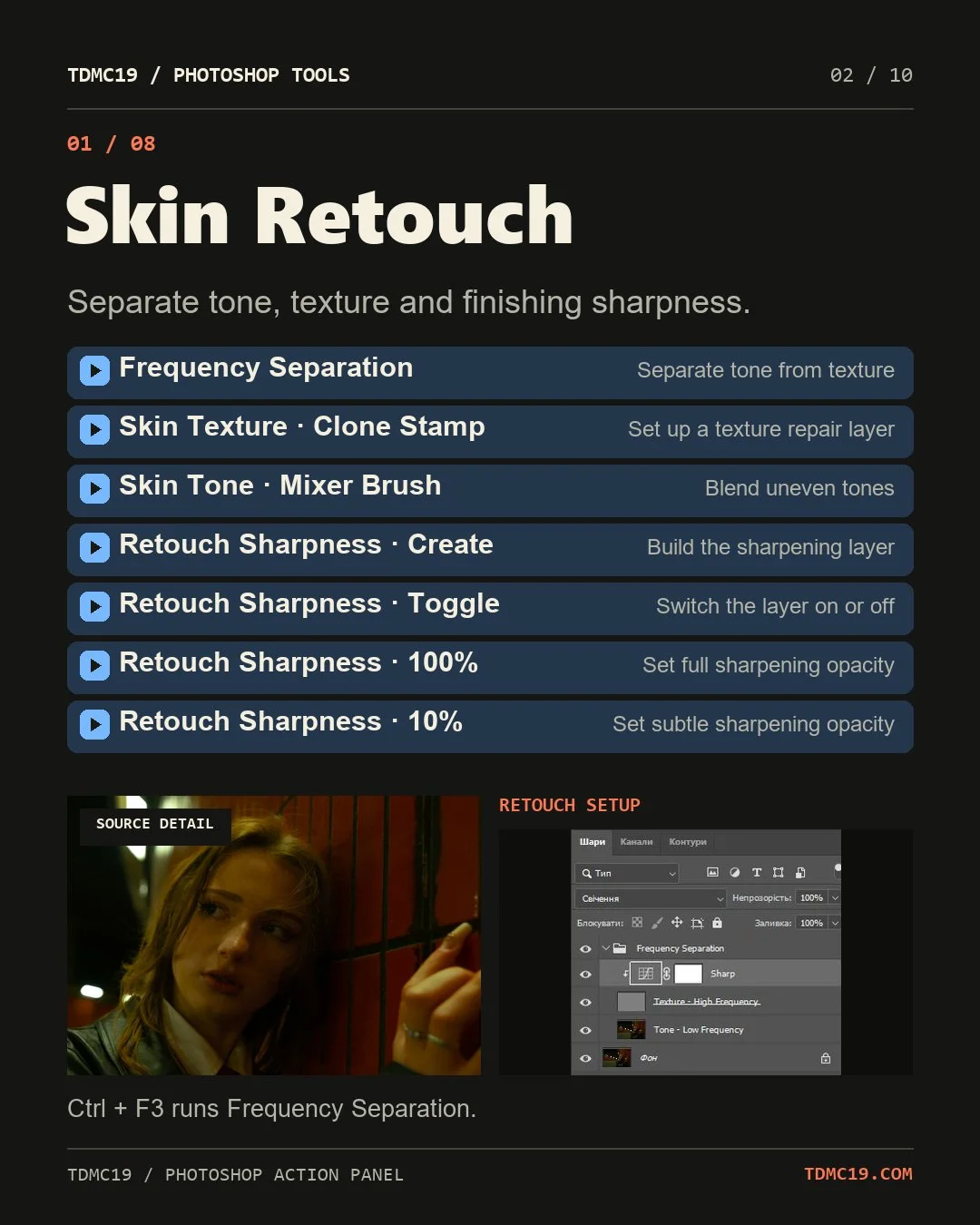 Image 2 of 10
 Image 3 of 10
 Image 4 of 10
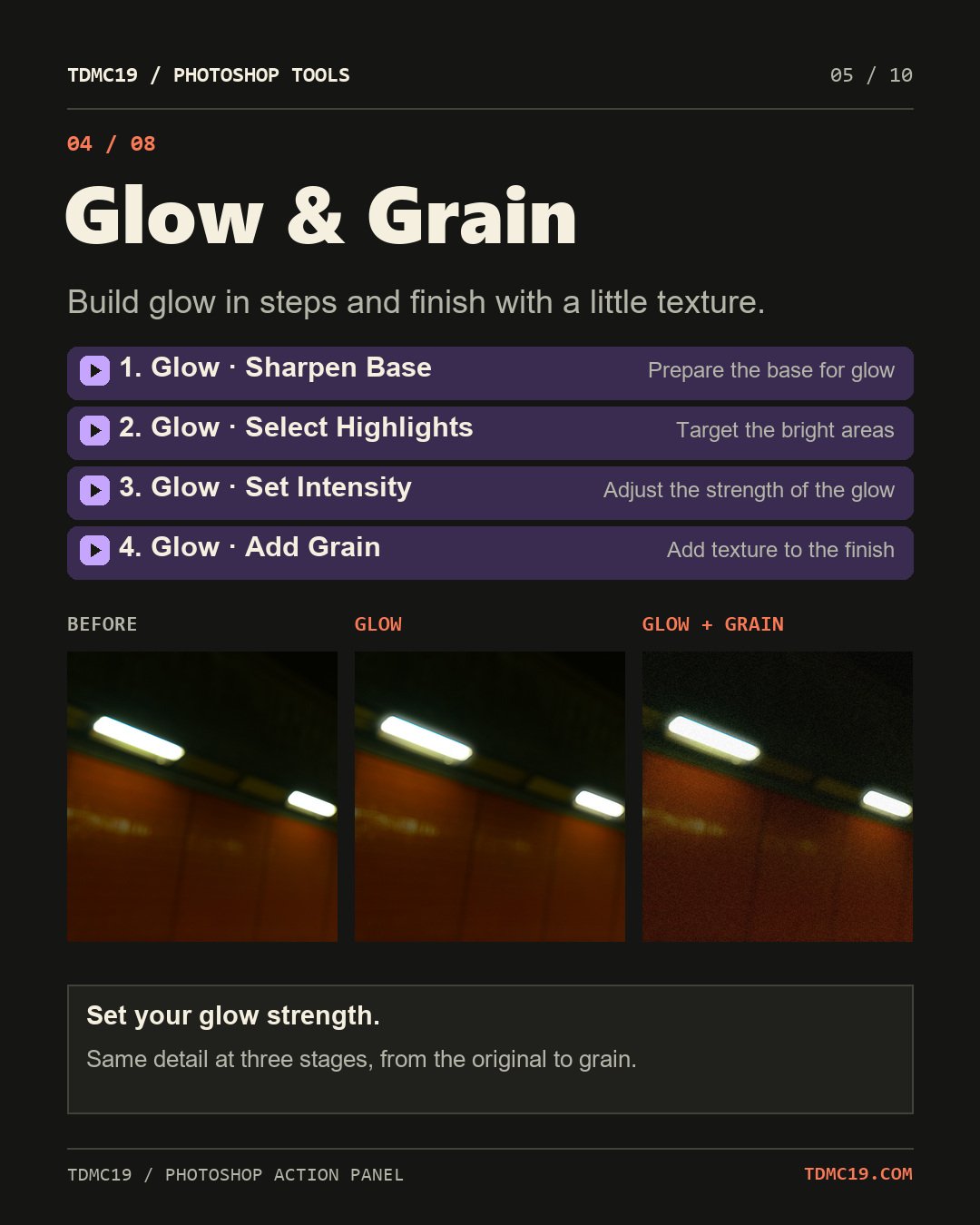 Image 5 of 10
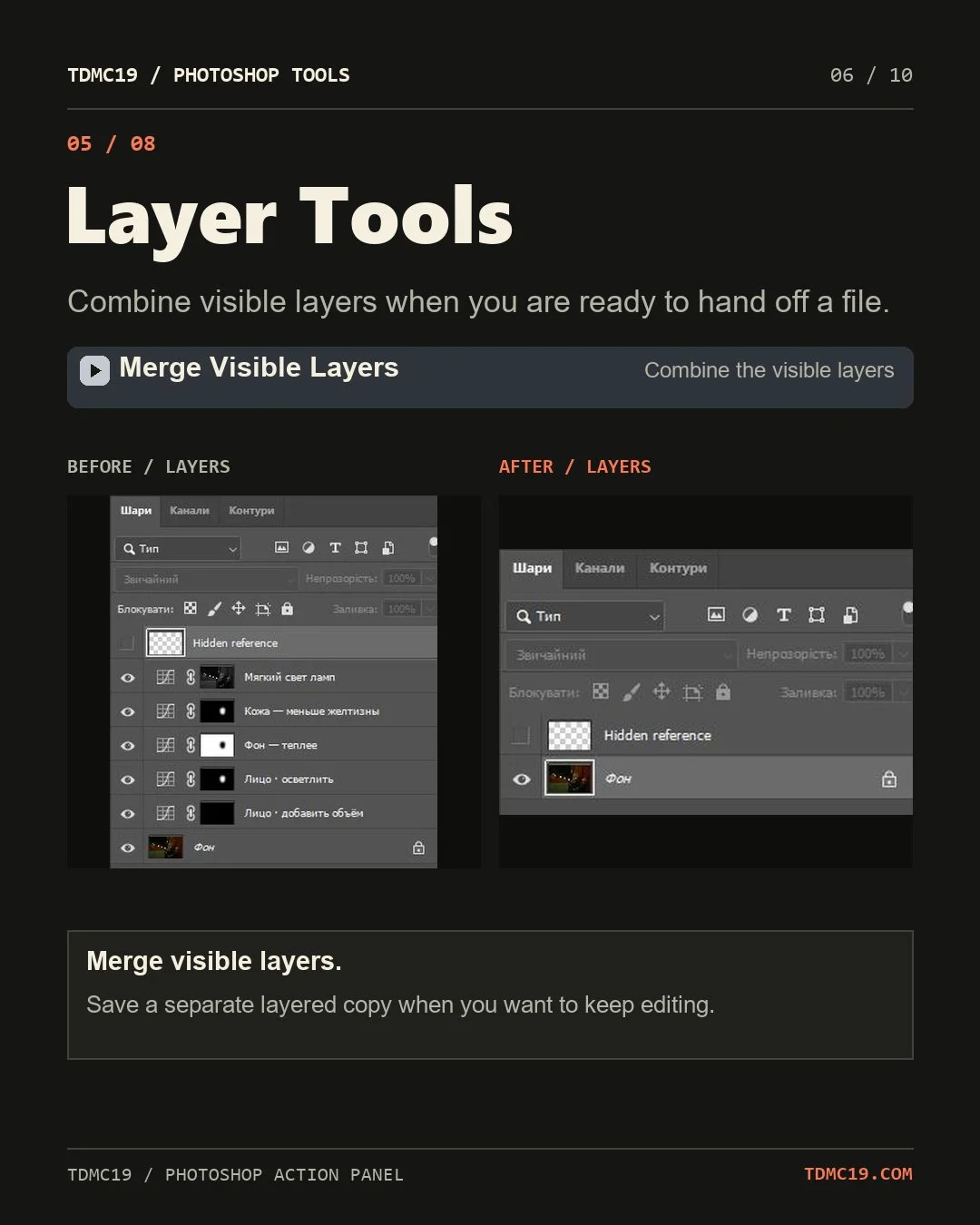 Image 6 of 10
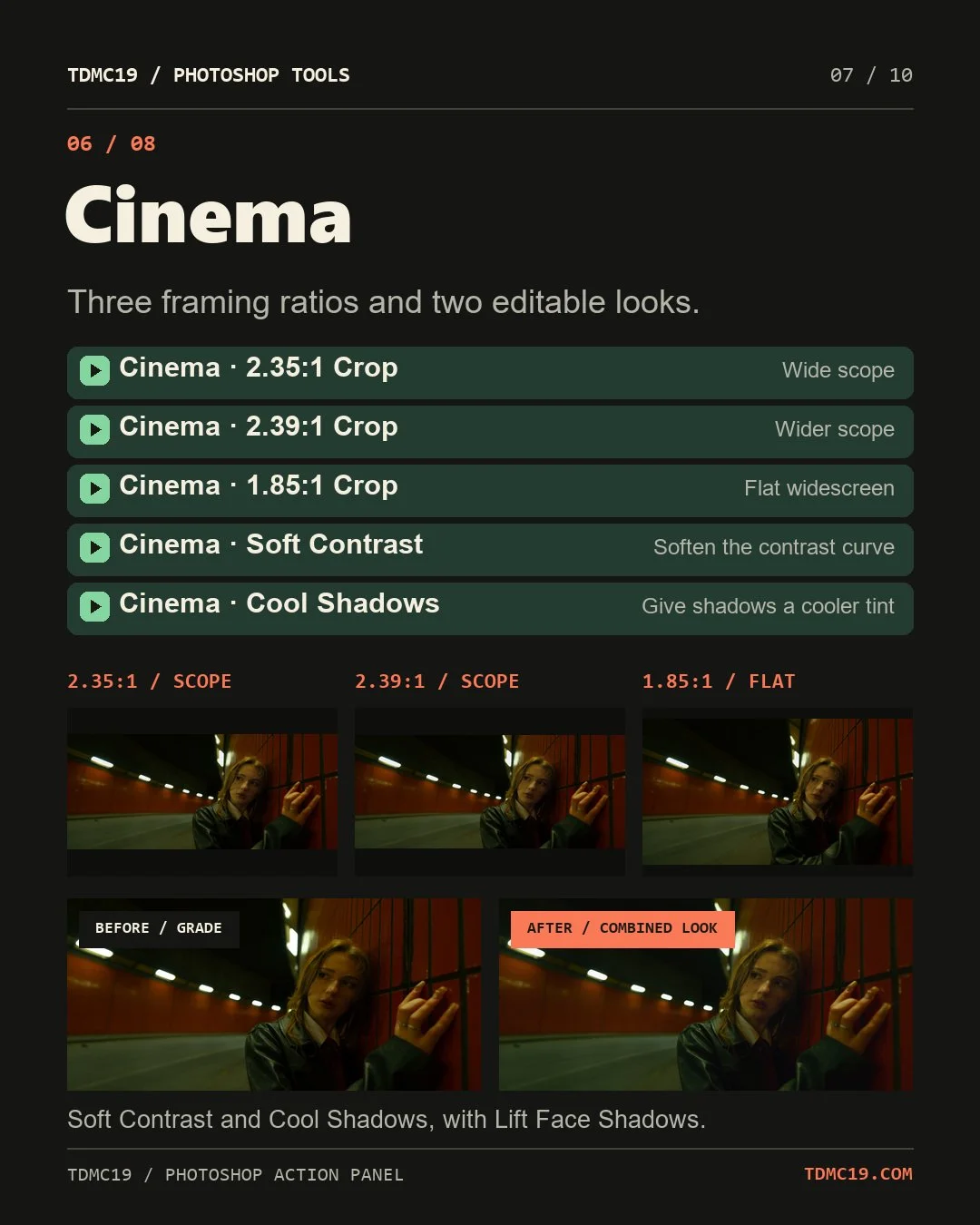 Image 7 of 10
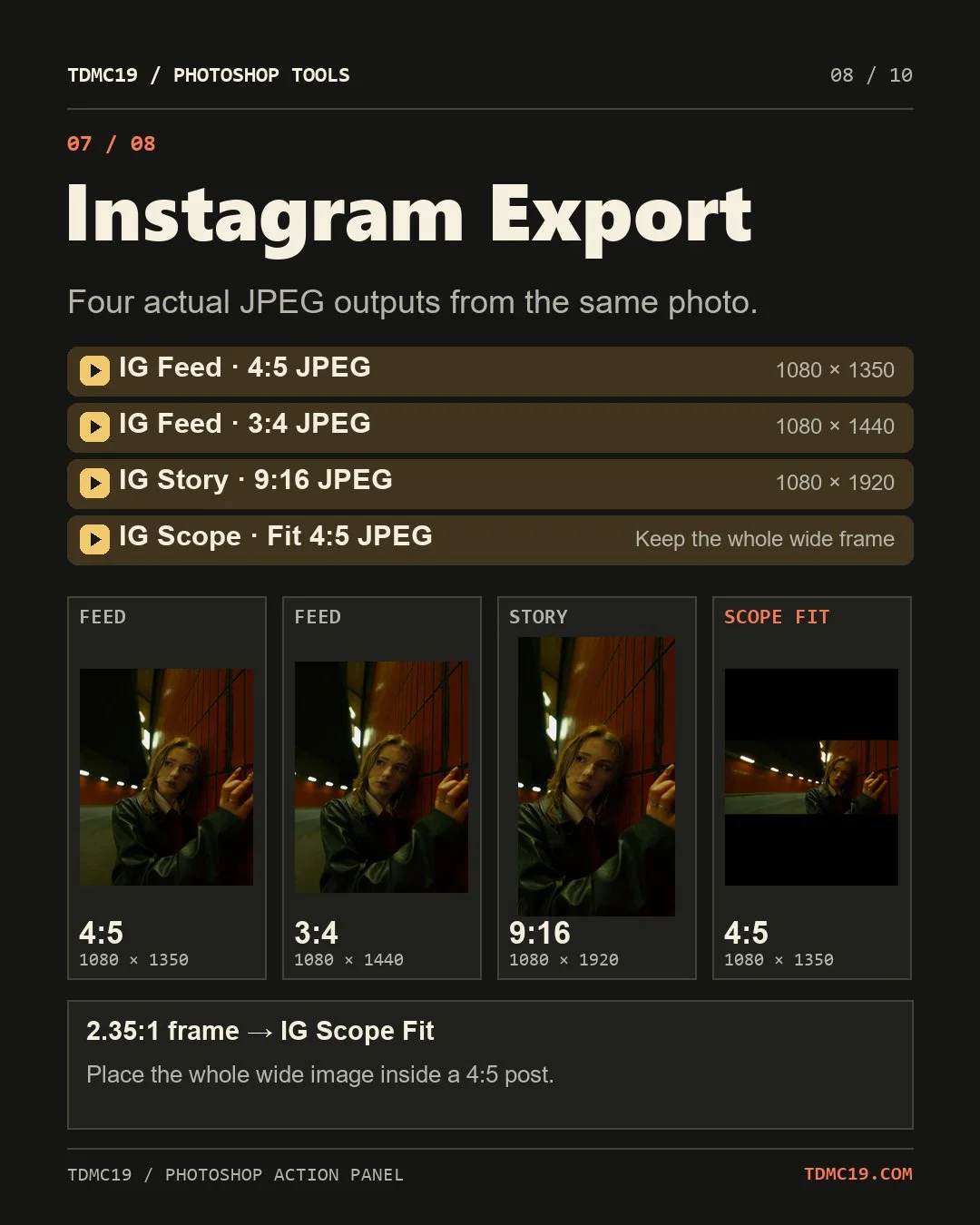 Image 8 of 10
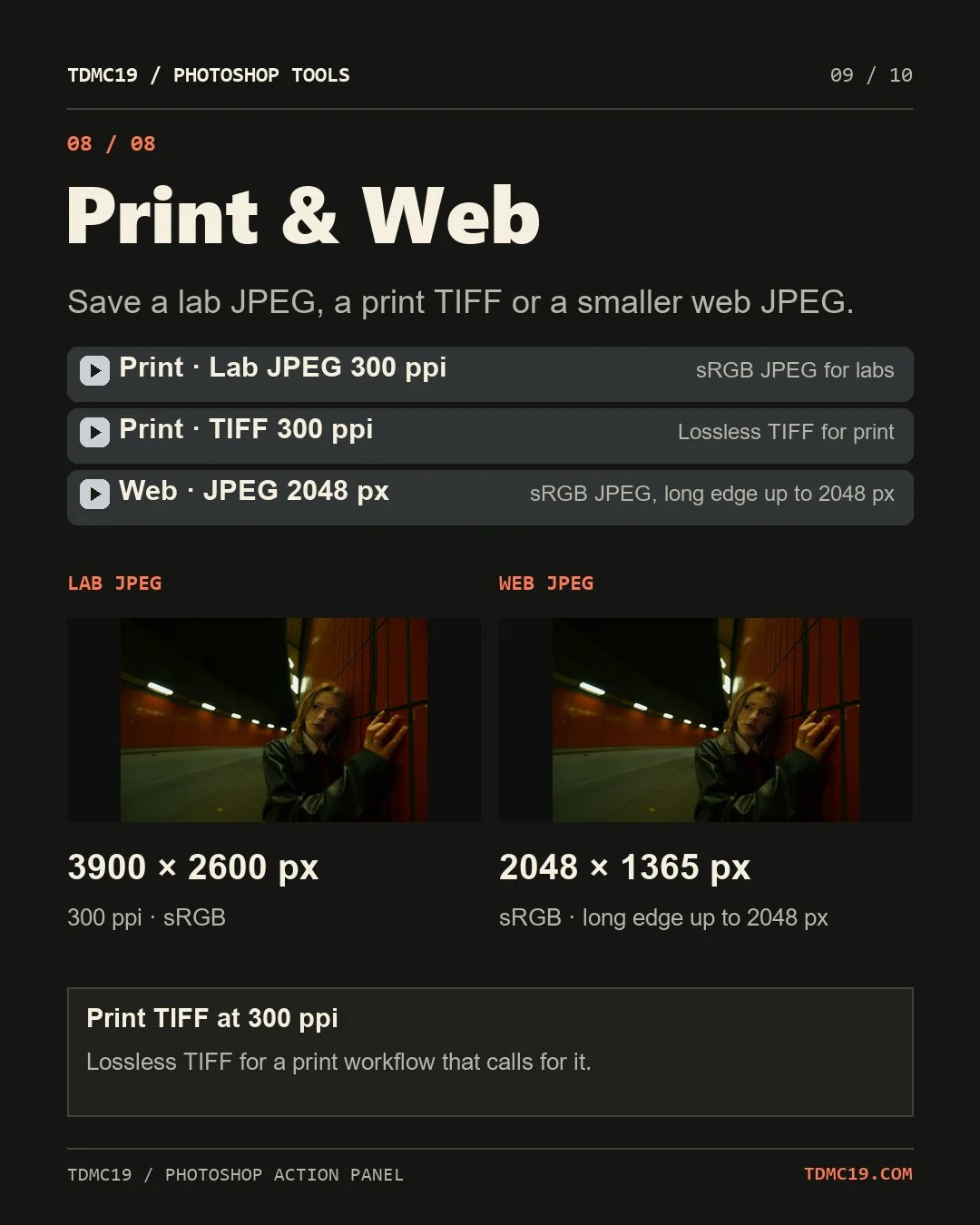 Image 9 of 10
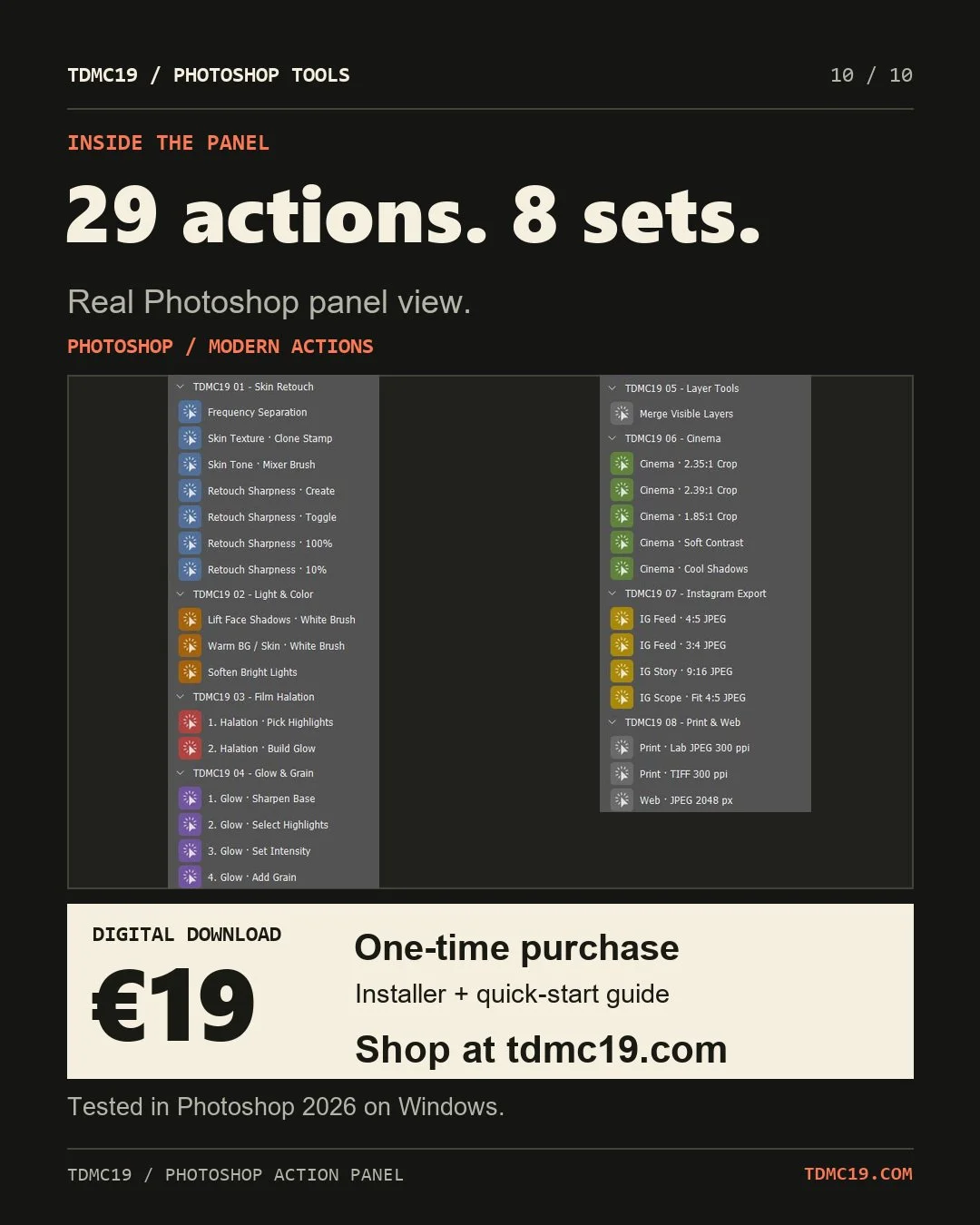 Image 10 of 10